

Help Center
QuickBooks Expense Defaults
Set default expense and payment accounts for vendors.
Updated June 21, 2026
QuickBooks Integration: Expense Defaults
QuickBooks Online integration defaults ensure that every data block (customers, vendors, invoices, bills, catalog, etc.) has the required data for proper syncing. Without these settings, synchronization errors may occur.
Note: After connecting your Werx and QuickBooks Online accounts and importing initial data, import your catalog items (Products & Services) first.
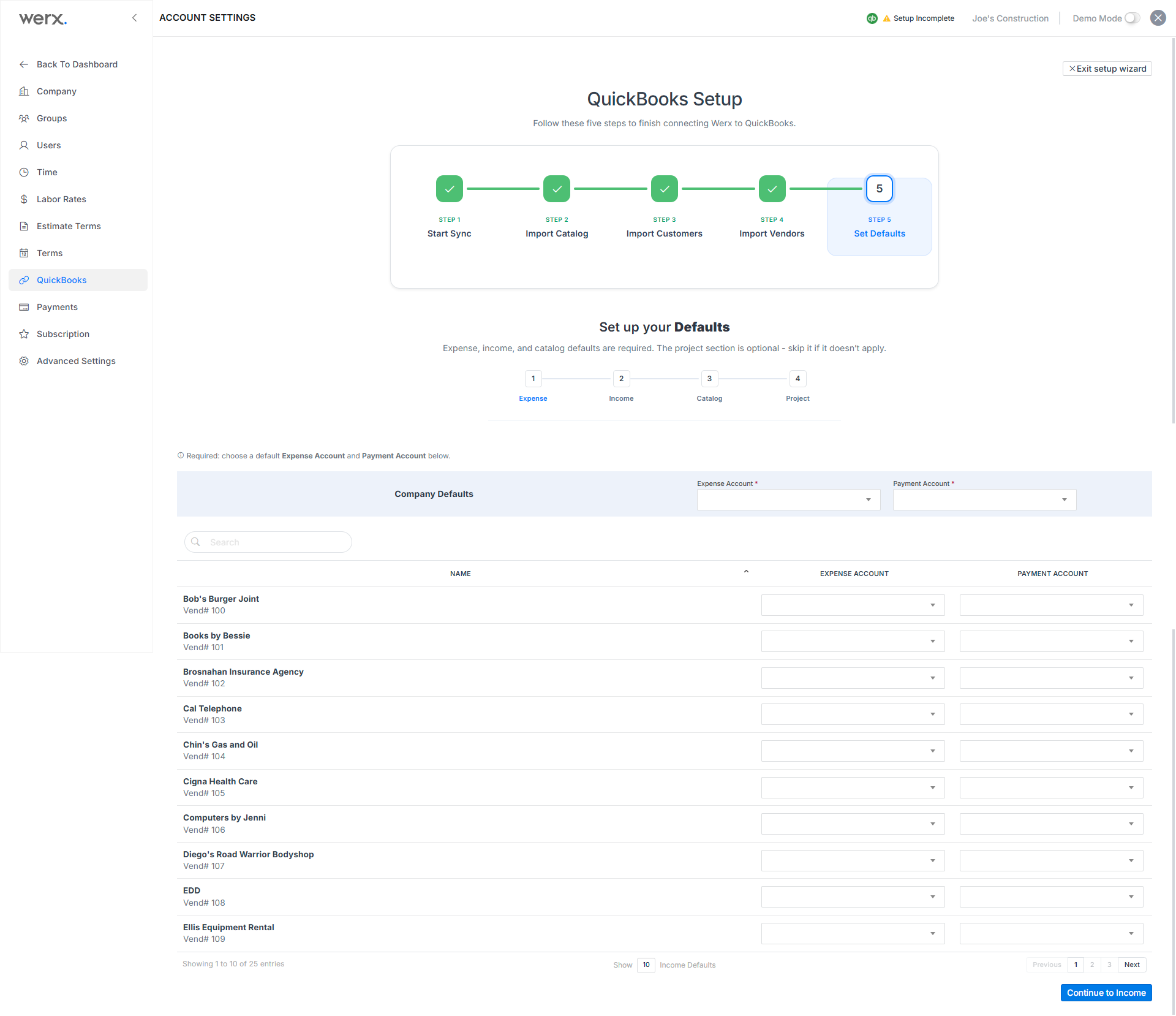
Expense Defaults will be automatically applied to new vendors created in Werx. These settings can be modified when creating or editing a vendor in the main customer section.
Set Income Defaults
- In the accounts settings section, select QuickBooks in the left navigation.
- Click Defaults > Expense Defaults in the top tabs of the QuickBooks screen.
- Select default Expense Account and Payment Account from the dropdown fields.
Once vendors are established in Werx, you can edit their individual default settings on this screen or in the main customer editing section.