

Werx Academy
What Is a Schedule of Values (SOV)?
The billing roadmap that turns your contract sum into line items owners can verify and pay.
A schedule of values (SOV) breaks your contract sum into billable line items. It ties your estimate to your billing. Each line shows percent complete, so owners pay for work they can verify. The SOV drives all AIA and progress pay application math.
How does a schedule of values work?
An SOV lists each scope item with its contract value. That lets you measure progress and bill it line by line. Owners, lenders, and auditors use it to check work against each payment request.
- Breaks the total contract into billable line items
- Tracks percent complete and earned value by line
- Feeds the G702/G703 and progress billing math
- Supports retainage and stored-materials tracking
| Line item | Scheduled value | % complete | Completed to date | |
|---|---|---|---|---|
| 1 | Mobilization & permits | $10,000 | 100% | $10,000 |
| 2 | Rough-in | $70,000 | 80% | $56,000 |
| 3 | Panels & gear | $50,000 | 45% | $22,500 |
| 4 | Fixtures | $45,000 | 20% | $9,000 |
| 5 | Trim & final | $25,000 | 0% | $0 |
Why do contractors use an SOV?
A standard SOV speeds approvals and cuts disputes. It puts scope, cost, and progress in one document everyone trusts.
- Creates clear transparency for owners and lenders
- Speeds pay app reviews with a consistent structure
- Reduces change-order and retainage fights
- Improves the audit trail for financing and closeout
What should you include in an SOV?

Keep the format the same across every job. Match it to your estimate and your cost codes.
- Line item description tied to standard cost codes
- Units, quantities, and a line value (or unit price times quantity)
- A retainage rate for each line, applied the same way
- Fields for previously billed, this period, and to date
Here is a simplified example of a $250,000 contract broken into SOV lines:
| Line item | Scheduled value | % complete | Earned to date |
|---|---|---|---|
| General conditions | $20,000 | 50% | $10,000 |
| Foundation | $40,000 | 100% | $40,000 |
| Framing | $60,000 | 75% | $45,000 |
| Mechanical and electrical rough-in | $50,000 | 40% | $20,000 |
| Interior finishes | $70,000 | 0% | $0 |
| Punch list and closeout | $10,000 | 0% | $0 |
| Total | $250,000 | 46% | $115,000 |
How do you build an SOV from your estimate?
Start with your estimate. Group items into billable SOV lines that match how you report progress. See the full walk-through in build a schedule of values from an estimate.
- Group related estimate items into clear SOV categories
- Map cost codes so field time and purchasing roll up right
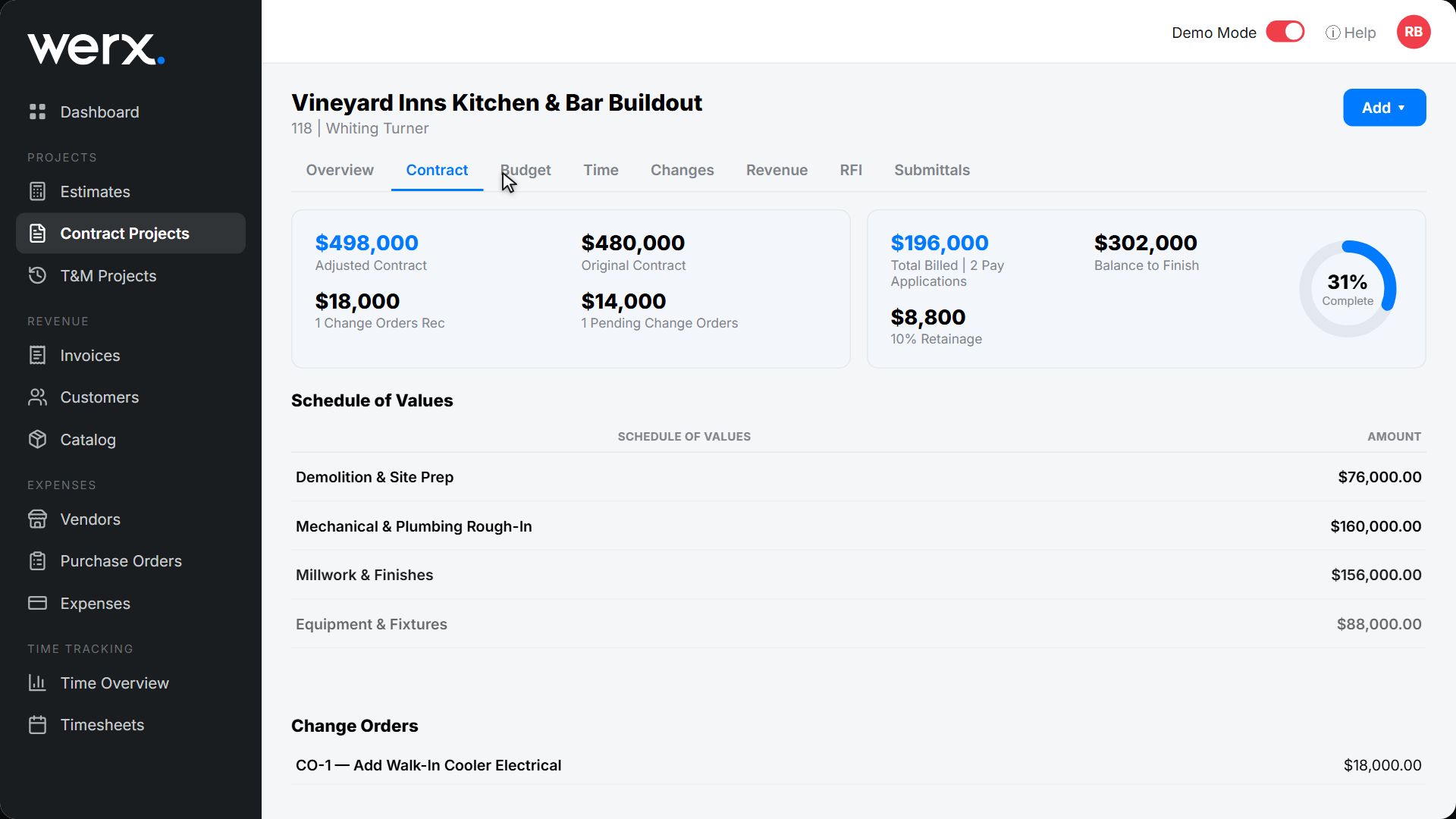
- Build the SOV in Werx Estimates
- Confirm the SOV total equals the contract price before pay app one
What SOV mistakes should you avoid?
Most billing delays come from structure or math problems. Standardize your template and double-check the rollups.
- SOV total does not match the contract sum
- Retainage applied unevenly across line items
- Stored-materials credits not carried forward correctly
- Change orders left out of the SOV lines
When should you use a detailed SOV?
Use a detailed SOV on long jobs, AIA work, and any job a lender funds. More lines mean clearer progress and faster approvals.
Keep it lighter on small private jobs. A short SOV or a simple progress invoice may be enough there. Let the contract and the owner set the bar.
- The job runs more than a month or has phases
- A lender or owner requires AIA pay applications
- You hold retainage and bill stored materials
- The scope is large enough to measure line by line
How does software simplify SOVs?
Contractor software like Werx builds the SOV and ties it to billing. It handles retainage, stored materials, and accounting in one place.
- Create or import SOVs and generate AIA G702/G703 pay apps
- Auto-calculate retainage, stored materials, and current due
- Update SOV lines the moment a change order is approved
- Sync to QuickBooks Online for clean financials
Key takeaways
- An SOV is your contract value broken into billable line items
- It drives AIA and progress billing, retainage, and stored materials
- Build it from your estimate and align it with cost codes for clean rollups
- Werx automates SOVs, pay apps, change orders, and QuickBooks sync
Frequently Asked Questions
Is a schedule of values the same as a bid?
No. A bid or estimate sets your pricing. The SOV is the official billing breakdown used for progress and AIA pay applications.
Who creates and updates the SOV?
Usually the GC or prime contractor drafts the SOV for owner and architect review. It is updated when change orders are approved.
How often should the SOV change?
Set it at contract award. Update it only when scope changes. Monthly pay apps should adjust percent complete, not the SOV structure.
Ready to grow your business?
Start your 14-day free trial today. No credit card required.
No credit card required · Free migration assistance · Cancel anytime