

Werx Academy
What Is Stored Materials Billing?
Stored materials billing lets you invoice for materials bought and stored before they go in.
Stored materials billing lets you invoice for materials bought and stored before installation. The materials can sit off-site or on-site. It protects cash flow on long-lead items. Owners get proof the materials are on hand, secured, and dedicated to the job.
How does stored materials billing work?
You do not wait until installation to bill. You invoice for eligible materials once they are delivered and documented. Owners see the project is ready, and you avoid tying up cash in inventory.
- Invoice materials before installation with proper proof
- Show that items are dedicated to the specific project
- Often used with AIA pay applications
- Supports steady cash flow on long-lead purchases
What documentation do stored materials need?
Strong documentation is the key to approval. Prove the materials exist, are secured, and belong to the project. Then keep an audit trail for lenders and owners.
- Supplier invoices and paid receipts
- Photos with item IDs, quantities, and date stamps
- Storage location details and custody or security info
- Proof of insurance and title transfer if required
What are the common calculation mistakes?
Math errors and missing credits are the top reasons stored-materials lines get rejected. Align quantities and values to your schedule of values. Carry credits forward as items get installed.
- Match quantities and cost to the SOV line items
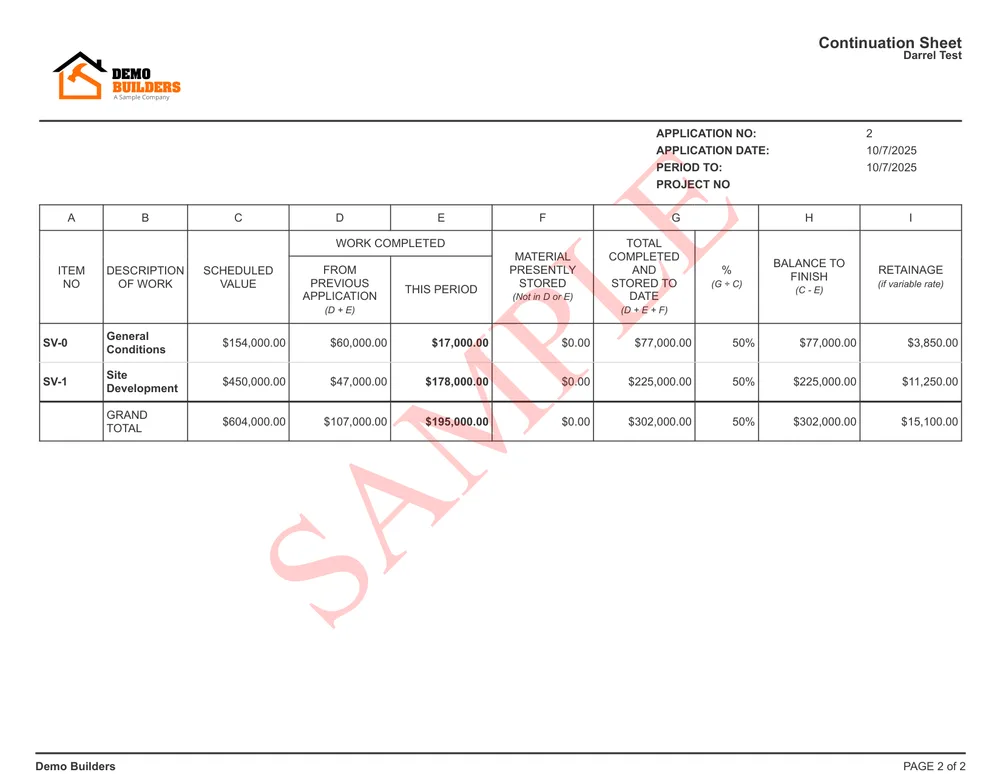
- Apply *previously stored* and *currently stored* values accurately
- Reduce the stored amount as materials get installed
- Avoid double-billing when moving costs from stored to installed
| Line item | Scheduled value | % complete | Completed to date | |
|---|---|---|---|---|
| 1 | Mobilization & permits | $10,000 | 100% | $10,000 |
| 2 | Rough-in | $70,000 | 80% | $56,000 |
| 3 | Panels & gear | $50,000 | 45% | $22,500 |
| 4 | Fixtures | $45,000 | 20% | $9,000 |
| 5 | Trim & final | $25,000 | 0% | $0 |
When should you bill for stored materials?
Bill for stored materials when the contract allows it. It helps most on long-lead items like equipment, fixtures, or custom steel. You also need the materials secured and well documented first.
Hold off if the contract bars it or the materials are not yet secured. Without solid proof, owners and lenders will reject the line.
- The contract permits stored-materials billing
- The items are long-lead and already purchased
- The materials are secured and dedicated to the job
- You have receipts, photos, and storage proof ready
How do you avoid stored-materials disputes?

Set expectations early with the owner and lender. Agree on what qualifies as stored and how you will document it. Consistent labeling and updates keep approvals smooth.
- Agree on documentation standards in the contract
- Label pallets and serials with project name and SOV code
- Provide monthly photo updates and inventory counts
- Use the same terms as your G702 and G703 forms
How does software simplify stored materials billing?
Contractor software like Werx ties documentation, SOV lines, and retainage rules into your pay apps. Generate AIA-style billing, attach proof, and sync to accounting with fewer errors.
- Attach photos, receipts, and custody notes to SOV items
- Auto-calculate previously stored, currently stored, and credits
- Track retainage on stored materials consistently
- Sync with QuickBooks Online for clean records
Learn more about AIA billing and how Werx handles stored materials in pay applications.
Key takeaways
- Stored materials billing means you invoice eligible materials before installation
- Approval depends on strong documentation and clear SOV alignment
- Avoid double-billing when moving costs from stored to installed
- Werx simplifies proof, SOV math, retainage, and QuickBooks sync
Frequently Asked Questions
What counts as "stored materials"?
Materials you have purchased and secured for the project, either on-site or off-site. That includes equipment, fixtures, and long-lead items. They must be clearly dedicated to the project and properly documented.
Do I need photos or receipts to bill stored materials?
Yes. Owners and lenders typically require supplier invoices and receipts, photos with dates and quantities, storage details, and proof of insurance or custody.
How is retainage handled on stored materials?
Retainage usually applies to stored materials at the same rate as installed work. As items get installed, reduce the stored amount and carry value into work in place to avoid double-billing.
Ready to grow your business?
Start your 14-day free trial today. No credit card required.
No credit card required · Free migration assistance · Cancel anytime