

Werx Academy
What Is AIA Billing? A Complete Guide to G702 & G703 Pay Apps
AIA billing is a standard way to request payment on construction jobs. It uses set G702 and G703 forms.
AIA billing, also called AIA pay applications, is a standard method of progress billing. The American Institute of Architects created it. You use the G702 and G703 forms to bill for completed work, track retainage, and show progress.
What are AIA pay applications?
AIA billing is the industry-standard format for progress billing on construction jobs. It gives contractors and owners one consistent way to track payments. Most contractors submit one pay application each month.
Each application shows the same core numbers:
- Percent of work completed
- Amount billed to date
- Retainage withheld, often 5 to 10 percent
- Current payment due
Why do contractors use AIA billing?
Contractors use AIA billing because it standardizes documentation and cuts confusion. It also meets the requirements lenders and auditors expect. Many commercial and public jobs require it before they release a payment.
- Builds trust with owners through clear records
- Provides the documentation lenders and banks expect
- Keeps retainage and progress payments organized
- Reduces billing disputes and payment delays
What are the G702 and G703 forms?
The AIA process centers on two forms. They work together to show the big picture and the line-by-line detail. See how they connect in our guide to the G702 and G703 forms.
- G702, Application for Payment: the summary form showing contract value, retainage, and balance due
- G703, Continuation Sheet: the detailed breakdown, tied to your schedule of values
| 1 | Original contract sum | $266,350.00 |
| 2 | Net change by change orders | $4,046.00 |
| 3 | Contract sum to date | $270,396.00 |
| 4 | Total completed & stored to date | $62,789.85 |
| 5 | Retainage (10%) | $6,278.99 |
| 6 | Total earned less retainage | $56,510.86 |
| 7 | Less previous certificates for payment | $31,240.50 |
When should you use AIA billing?
Use AIA billing when a job requires G702 and G703 forms. Most government and large commercial contracts do. Lenders often require it before they fund a draw.
Skip the AIA format on small private jobs. Flexible progress billing is simpler there. Not sure which fits? Compare both in progress billing vs. AIA billing.
- The contract or lender requires G702/G703 forms
- The job is commercial, public, or bank-financed
- You bill monthly and track retainage
- The owner wants standardized proof of progress
What are the common challenges with AIA billing?
AIA billing can be slow and error-prone when done by hand. Even a small mistake can stall approval. Payment terms are often net 30, so a delay hurts cash flow.
- Time-consuming manual calculations
- Errors on G702 or G703 forms delay approval
- Tracking retainage across projects gets messy
- Paper forms invite disputes and rework
How does software simplify AIA billing?
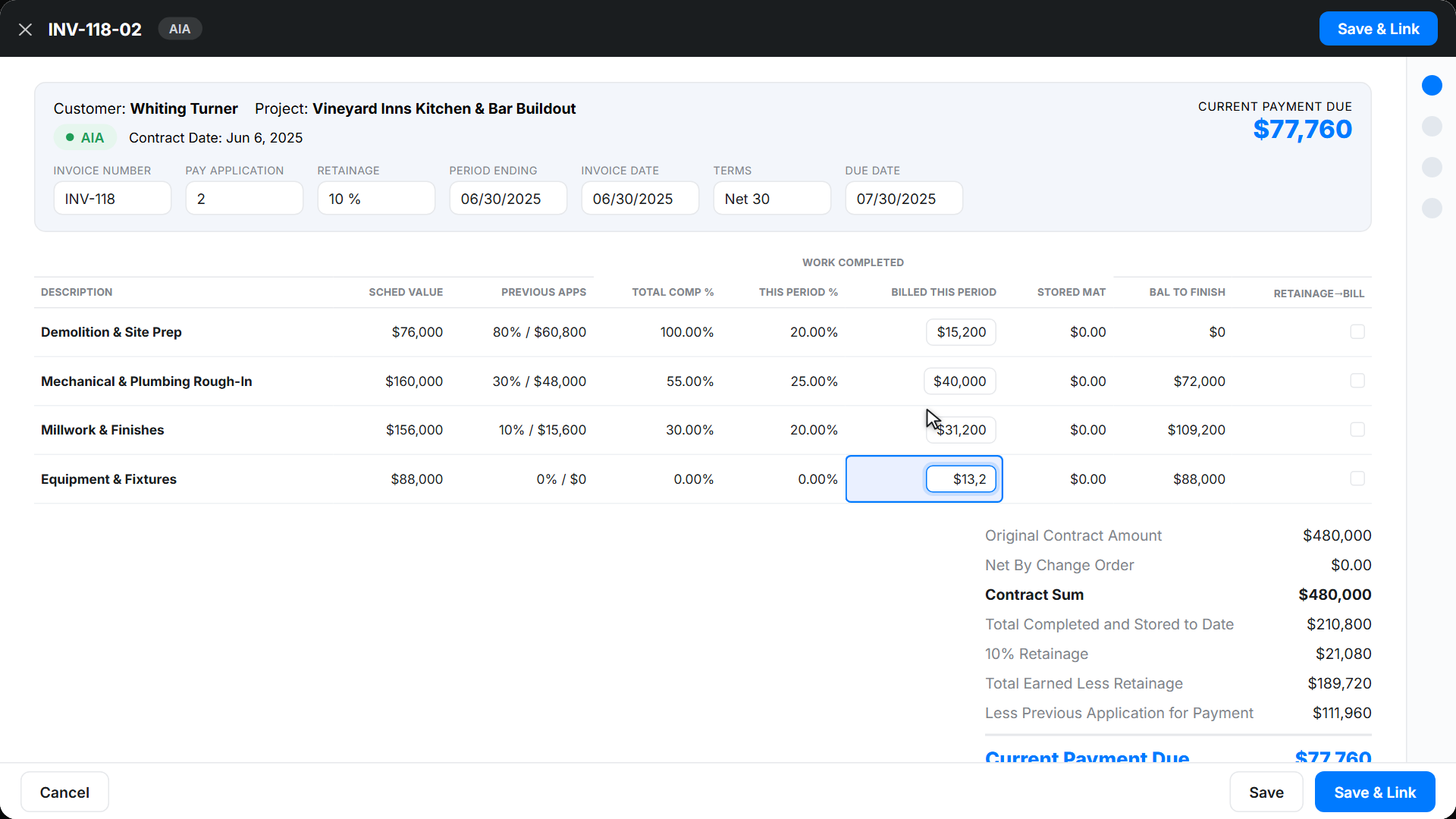
Contractor software like Werx automates AIA-style pay applications. You save time and cut errors. Werx ties billing to your accounting workflow, so the books stay clean.
- Build schedules of values right in the system
- Auto-calculate retainage and payment due
- Sync with QuickBooks Online for accurate books
- Generate G702 and G703 style forms in minutes
Key takeaways
- AIA billing is standardized progress billing using G702 and G703 forms
- The G702 summarizes the job; the G703 shows line-by-line detail
- Most commercial, public, and bank-financed jobs require the AIA format
- Werx handles the forms, retainage math, and QuickBooks sync for you
Frequently Asked Questions
What does AIA stand for in AIA billing?
AIA stands for the American Institute of Architects. They created the G702 and G703 forms that contractors use to bill for work completed. These forms are the industry benchmark for progress billing in construction.
What is retainage in AIA billing?
Retainage is payment withheld, usually 5 to 10 percent, until the project reaches substantial completion. It protects owners and lenders by making sure contractors finish all work before they receive full payment.
Can small contractors use AIA billing?
Yes. AIA billing is common on large commercial jobs, but many small and midsized contractors use it too. Any project that needs transparency, lender approval, or government oversight can benefit.
Ready to grow your business?
Start your 14-day free trial today. No credit card required.
No credit card required · Free migration assistance · Cancel anytime