

Help Center
Record an expense
Enter a paid cost and code it to the right project and budget line.
Updated June 21, 2026
What is an expense?
Expenses are purchases that are already paid — Werx records them as paid automatically. Money you'll pay a vendor later is a bill instead.
Record an expense
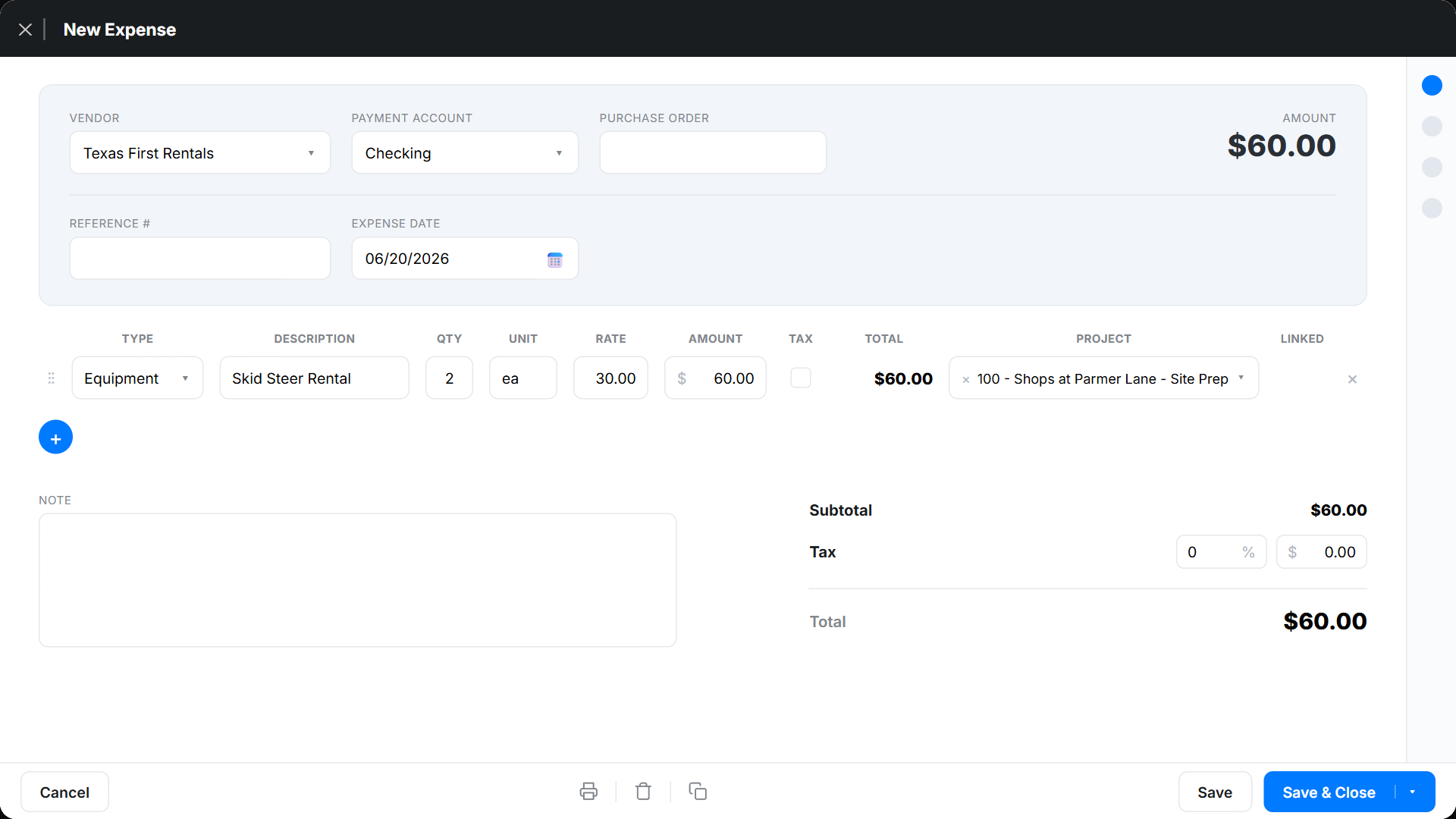
- Go to Expenses → Expenses and click + New Transaction → Expense.
- Choose the vendor, and optionally link a purchase order to pull in its line items.
- Add the date and a reference number.
- For each line, pick the Expense Type (Material, Equipment, Labor, Subcontractor, Other) and the Project → budget item the cost belongs to, then enter the amount.
- Click Save.
Sync to QuickBooks
For QuickBooks-connected accounts, click QuickBooks Sync at the top right once the expense is complete. If the button is greyed out, an administrator should check the QuickBooks integration.
Expense FAQ
What's the difference between an expense and a bill?
An expense is already paid (recorded as paid automatically). A bill is money you owe a vendor for future payment and stays open until you pay it.
Do expenses affect my project budget?
Yes. Each expense line is coded to a project and budget item, so it rolls into that project's job costs automatically.