

Help Center
Create an EWA in the field
Capture extra work and get it signed on the spot.
Updated June 21, 2026
An Extra Work Authorization (EWA) documents work a client requests outside the contract scope. Create one on your phone while you're on site and have the client sign right there. (For the full office workflow, see Extra Work Authorization.)
Create the EWA
- Tap EWA's in the bottom navigation and select the project.
- Tap the (+) button.
- Enter the date and a description of the requested work.
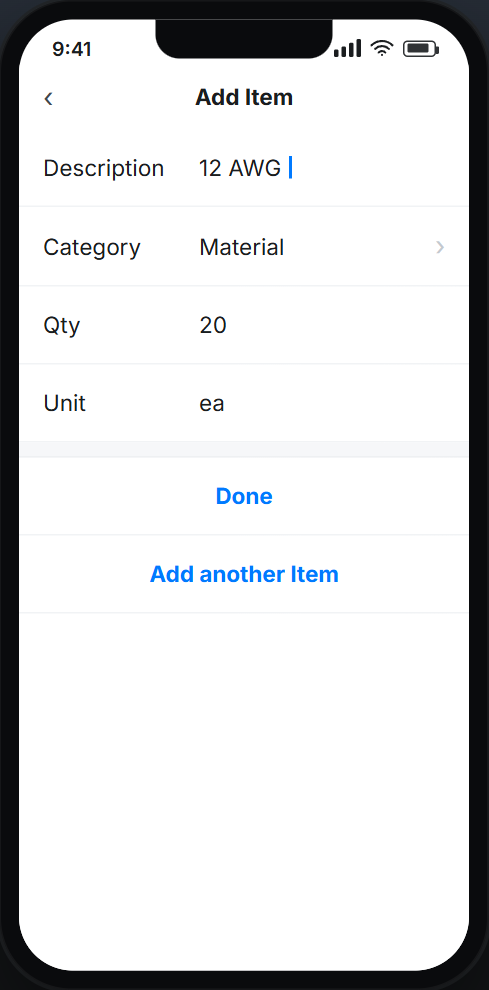
- Add line items — + Add Item, set a category (Material, Equipment, Labor, Subcontractor, Other), quantity, and unit.
- Attach photos or documents, then tap Save.
Authorize on site
Tap Authorize, hand the client your phone, and they enter their name and sign. When they tap Done, the signed EWA is saved and an email goes to the project contacts. Later, the office can turn it into a change order request.
Field EWA FAQ
Does an EWA include pricing?
No — an EWA documents the requested work. Pricing is added later on a change order request.
What permission do I need?
The Contract Projects → Extra Work Authorization permission on your user.