

Help Center
Invoices and getting paid
Send invoices, see what you are owed, and record payments, all tied back to the job.
Updated June 21, 2026
In Werx, every invoice lives under Revenue > Invoices. This is your accounts receivable in one place: what is open, what is past due, and what has been paid, across all of your projects.
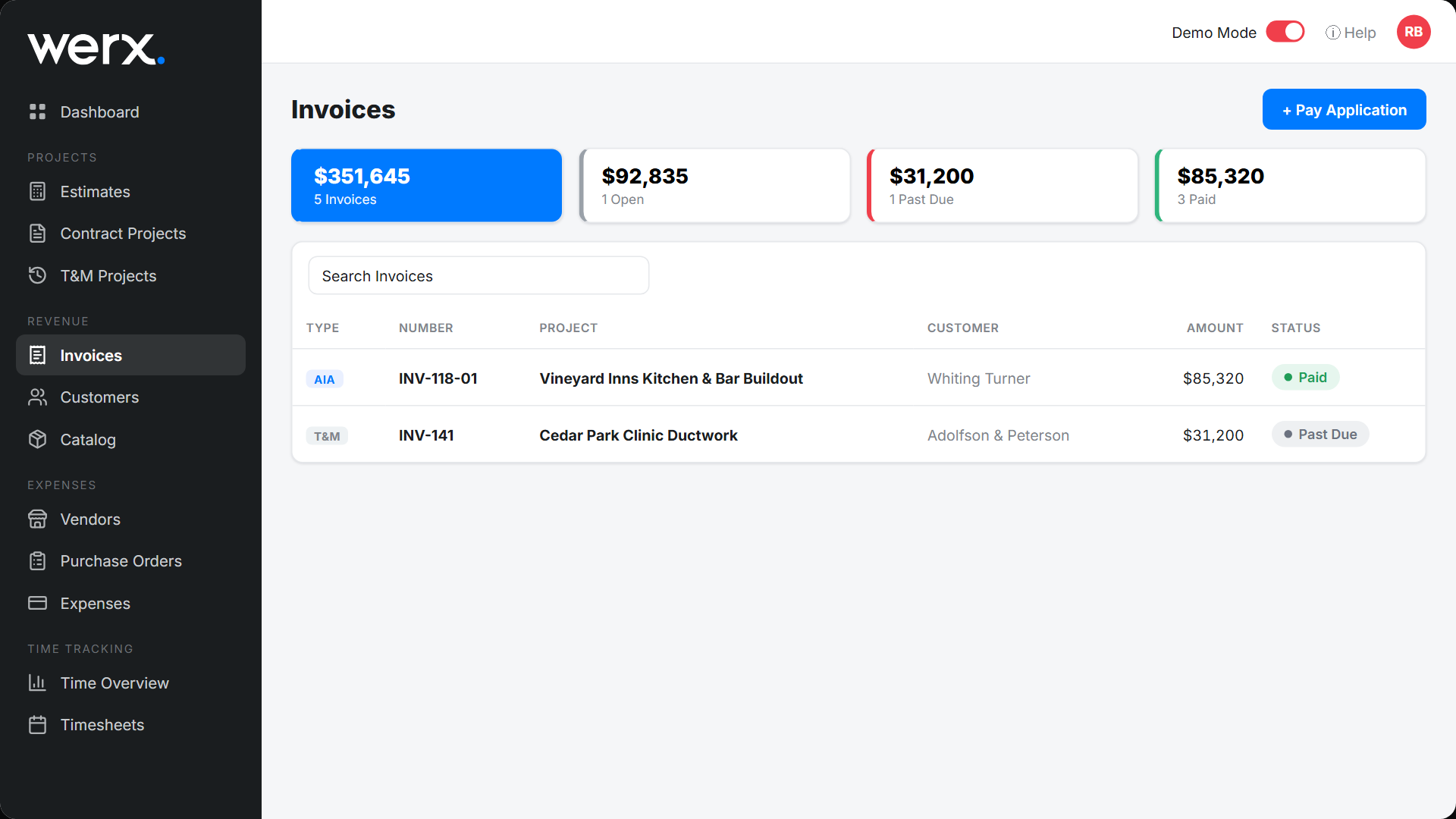
Reading the Invoices list
The cards across the top total your receivables at a glance, and the table below lists every invoice.
- Total, Open, Past Due, Paid cards summarize the dollars in each state.
- Each row shows the invoice Type (Standard, T&M, or AIA), Number, Project, Customer, Amount, and Status.
- A status is Open until the due date passes (then Past Due), and Paid once the full amount is recorded.
- Use Search Invoices to find one by number, project, or customer.
How invoices get created
Invoices are created from a project, so the billing always ties back to the job:
- Time & Material projects bill the work and materials you logged. See Time & Material Invoice.
- Contract projects bill by percent complete as a pay application, in a standard or AIA-style format. See AIA-Style Billing and Create Pay Applications.
You can also start a pay application straight from this screen with the + Pay Application button.
Send an invoice
When the invoice is ready, send it to your customer right from Werx.
- Save & Send emails the invoice to the project's customer contacts. You can add more email addresses and include a message.
- Save & Link gives you a link to the customer's invoice page that you can paste into any email or text.
- Your customer opens a branded page, with no login required. See What Your Customer Sees.
Get paid online
Connect Stripe and your customers can pay the invoice by card or bank transfer from that same page, which moves it to Paid automatically. See Get Paid Online (Stripe).
Record a payment
For payments you take outside Werx, such as a check or ACH, record the payment on the invoice so your receivables and the project's billing stay accurate.
- Open the invoice and choose to record a payment.
- Enter the amount, date, and method. A partial payment leaves the balance Open; a full payment marks it Paid.
- The payment flows back to the project and your accounts receivable totals.
Sync to QuickBooks
For accounts connected to QuickBooks Online, click QuickBooks Sync on the invoice to send it across. If the button is greyed out, have an administrator check your QuickBooks Online connection.
Invoices FAQ
Why is an invoice marked Past Due?
The due date set by its payment terms has passed without the full amount being recorded.
Can my customer pay online?
Yes, once you connect Stripe. They pay from the branded invoice page and it updates to Paid.
How do I invoice a contract or AIA job?
Those bill as pay applications by percent complete. See AIA-Style Billing.
Do invoices sync to QuickBooks?
Yes, for connected accounts, using the QuickBooks Sync button on the invoice.