

AIA billing for subcontractors means you bill the general contractor for your scope of work, not the owner. You use the same G702 and G703 style forms the GC uses, but only for your part of the job. Your certified amount then rolls up into the GC's larger application to the owner.
What does AIA billing mean for a subcontractor?
On an AIA job, money moves in a chain. The owner pays the general contractor. The GC then pays you.
So you never bill the owner. You bill the general contractor for your work. The GC folds your request into one larger application for the whole project.
Your pay app uses the same two forms everyone else uses. The G702 is the cover sheet that totals the money. The G703 is the continuation sheet that lists each line of work. New to these forms? Start with the G702 and G703 form basics.
The one big difference is scope. The GC bills for the entire building. You bill for your trade only, such as electrical or concrete.
Picture a school job. The district owns it and pays the GC. Your work as the electrician becomes one line in the GC's request to the district.
This chain shapes your cash flow. You can finish your work and still wait, because your money depends on the steps above you. That is why a correct, on-time pay app is your fastest path to payment.
How is a sub's pay app different from a GC's?
The forms look the same. What changes is what goes on them and who reads them.
A GC's application covers every trade on the job. Your application covers your subcontract alone. Your G702 total equals your contract value, not the project value.
Here is the quick contrast:
- A GC's app totals every trade; yours totals one subcontract.
- The architect certifies the GC's app; the GC certifies yours.
- The GC submits to the owner; you submit to the GC.
Your reader is also different. The GC reviews and certifies your numbers, not the architect. They check your percent complete against what they see in the field. Then the GC includes your approved amount in their own pay app to the owner.
Your pay app also needs your signature. You certify that the work billed is done and the amount is correct. Some owners or lenders want it notarized.
A missing signature stalls the whole package, so sign before you send.
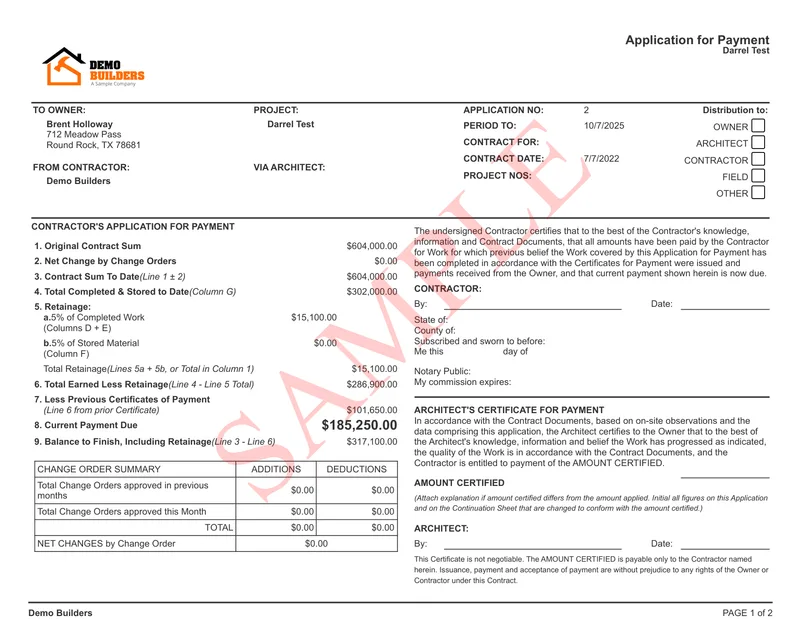
This is why your math has to be clean. If your G703 does not tie to your G702, the GC will send it back. A rejected pay app means you wait another month to get paid. Software that builds AIA-style billing forms keeps the cover sheet and the line items in sync.
How do you build your scope-only schedule of values?
Your schedule of values, or SOV, breaks your contract into billable parts. Each line is a piece of work with a dollar value. The lines add up to your full subcontract amount.
Keep the lines simple and clear. A line should map to work the GC can see and verify. For an electrician that might be rough-in, panels, fixtures, and trim. For more on this, see how to build a schedule of values.
Say your subcontract is worth $200,000. A simple SOV might split it like this:
- Mobilization and permits: $10,000
- Rough-in: $70,000
- Panels and gear: $50,000
- Fixtures: $45,000
- Trim and final: $25,000
Those five lines add up to your full $200,000 contract. You bill a percent of each line as the work gets done.
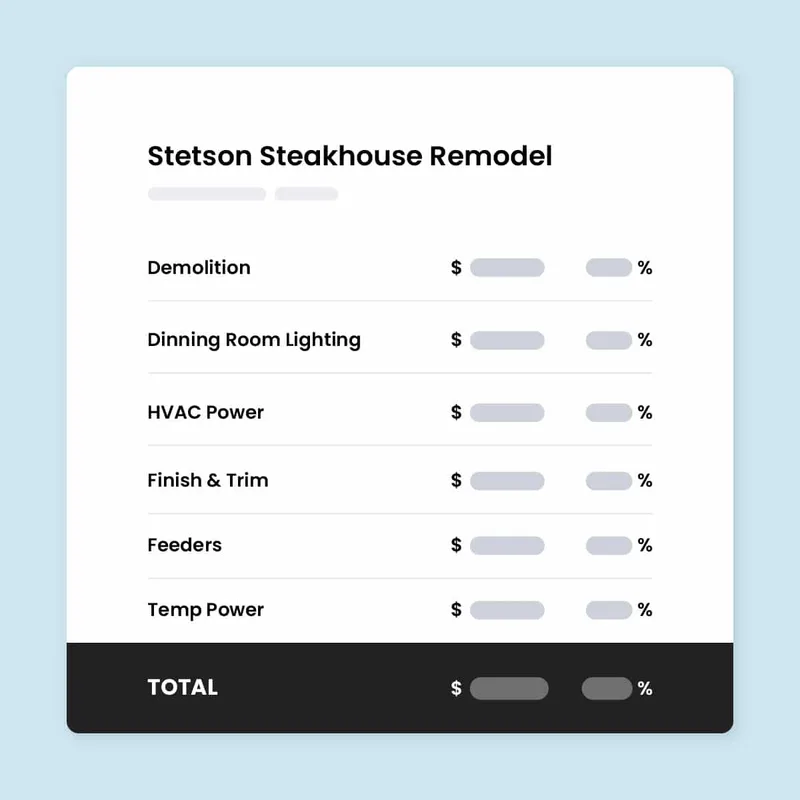
Set your SOV up once at the start of the job. You then bill against the same lines every month. Each cycle, you report how much of each line is done, by percent.
Do not make the lines too fine. Too many lines mean more to update and more places for errors. Each line should still be big enough to bill in steps.
When the GC approves a change order, add it as a new SOV line. Never bury extra work inside an existing line. A separate line keeps your billing clear and your records clean.
A clean SOV makes every later pay app faster and easier to defend.
How do your numbers roll into the GC's app?
Each billing period, you update your percent complete on every line. The G703 takes your work completed this period (Column G) against the scheduled value (Column C). The form then shows your total completed to date.
Here is the math on one line. Say a line is worth $70,000. You finished half this period, so you bill 50 percent, or $35,000.
The next month you reach 80 percent complete. Your total to date is now $56,000. You already billed $35,000, so this period you bill the $21,000 difference.
Stored materials can work the same way. If the GC allows it, you bill for materials bought and stored but not yet installed. They sit on their own line and usually carry the same retainage.
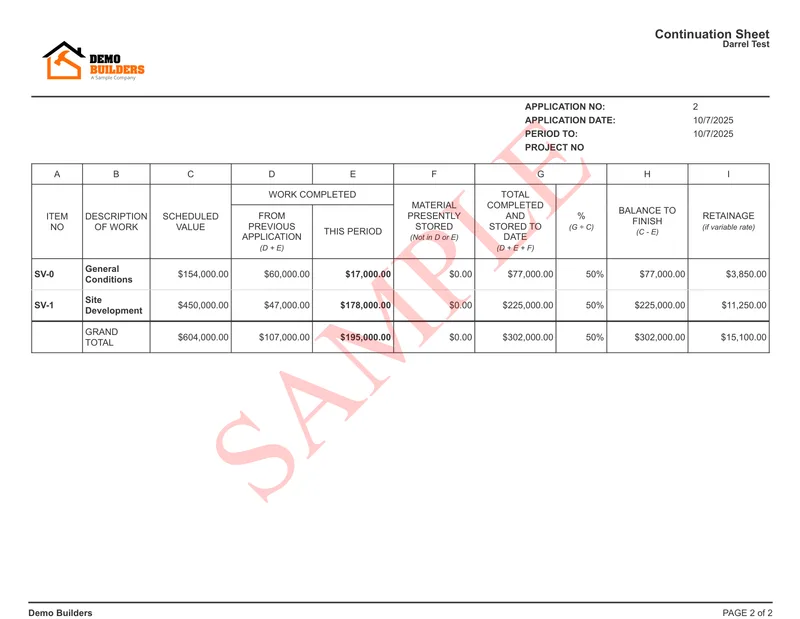
The GC reviews those percentages. They may walk the site to confirm your work. Once they agree, your certified amount becomes a single line on the GC's own application to the owner.
Retainage rides along the whole way. The GC usually holds 5% to 10% of your billed amount until the job is done. That held money sits in Column I of your G703. To see how the held amounts are figured, read our guide to retainage on G702 and G703 forms.
Tools built for progress billing carry your percent complete from cycle to cycle. You do not re-enter it each month. That keeps your running totals correct and your G702 in step with your G703.
Watch the GC's billing cutoff. Most GCs set a fixed day each month for pay apps. Miss it and your work waits until the next cycle.
Ask for that cutoff date at the start of the job. Then bill a few days early, with your backup ready.
What slows a sub's payment down?
A few things hold up a sub's check. Most of them are inside your control.
The biggest is pay-when-paid. Many subcontracts say the GC pays you after the owner pays the GC. So a slow owner means a slow check, even when your work is done. Net-30 or net-60 terms add more time on top of that.
Read your subcontract for this clause before you start. If it says pay-if-paid, your right to payment can hinge on the owner paying at all. Knowing the terms up front helps you plan your cash.
Math errors are the next cause. If your G703 does not match your G702, the GC bounces the app. A missing previous-applications figure or a wrong percent can cost you a full cycle. Our free subcontractor pay application builder ties the cover sheet and continuation sheet math together for you.
Backup matters too. The GC often wants photos, stored-material receipts, or a signed lien waiver with each pay app. The waiver amount must match the payment you are requesting. Werx does not create lien waivers. It does produce the accurate pay app the waiver must match, so read how lien waivers work before you sign one.
You can speed most of this up. Submit on the GC's schedule, on time, every cycle. Send complete backup the first time.
Most of all, keep your G703 tied to your G702. When the totals match, there is nothing for the GC to question.
How do you stay organized across several jobs?
Most subs run more than one job at a time. Each job has its own subcontract, its own SOV, and its own retainage held. That gets hard to track on paper.
Keep one SOV per subcontract. Bill each job on its own cycle, and never mix line items between jobs. A wrong line on the wrong job is a fast way to get a pay app kicked back.
Watch your retainage across all jobs, not just one. The 5% to 10% held on each job adds up to real money. Knowing the total tells you what is still owed and when to ask for release.
This is where a spreadsheet starts to crack. Contractor software like Werx keeps each subcontract, its SOV, and its retainage in one place. You see what you billed, what you collected, and what is still held, on every job.
When does a sub need AIA-style billing?
You need it whenever the GC asks for it. On most commercial and public jobs, AIA-style forms are required by the prime contract. If the GC bills the owner on a G702 and G703, you will bill the GC the same way.
You may not need it on small residential or cash jobs. A plain invoice can work when there is no progress billing and no retainage.
Use AIA-style billing once your jobs run for months, hold retainage, and bill by percent complete. At that point a spreadsheet gets risky. One wrong line can cost you thousands at retainage release. Contractor software like Werx builds the G702 and G703 style forms. It ties the math together and tracks every held dollar.
Key takeaways
- As a subcontractor, you bill the general contractor, not the owner.
- Your pay app uses G702 and G703 style forms, but for your scope only.
- Build a clean schedule of values once, then bill it by percent complete each cycle.
- The GC certifies your amount, then rolls it into their application to the owner.
- Pay-when-paid terms, math errors, and missing backup are the top causes of delay.


