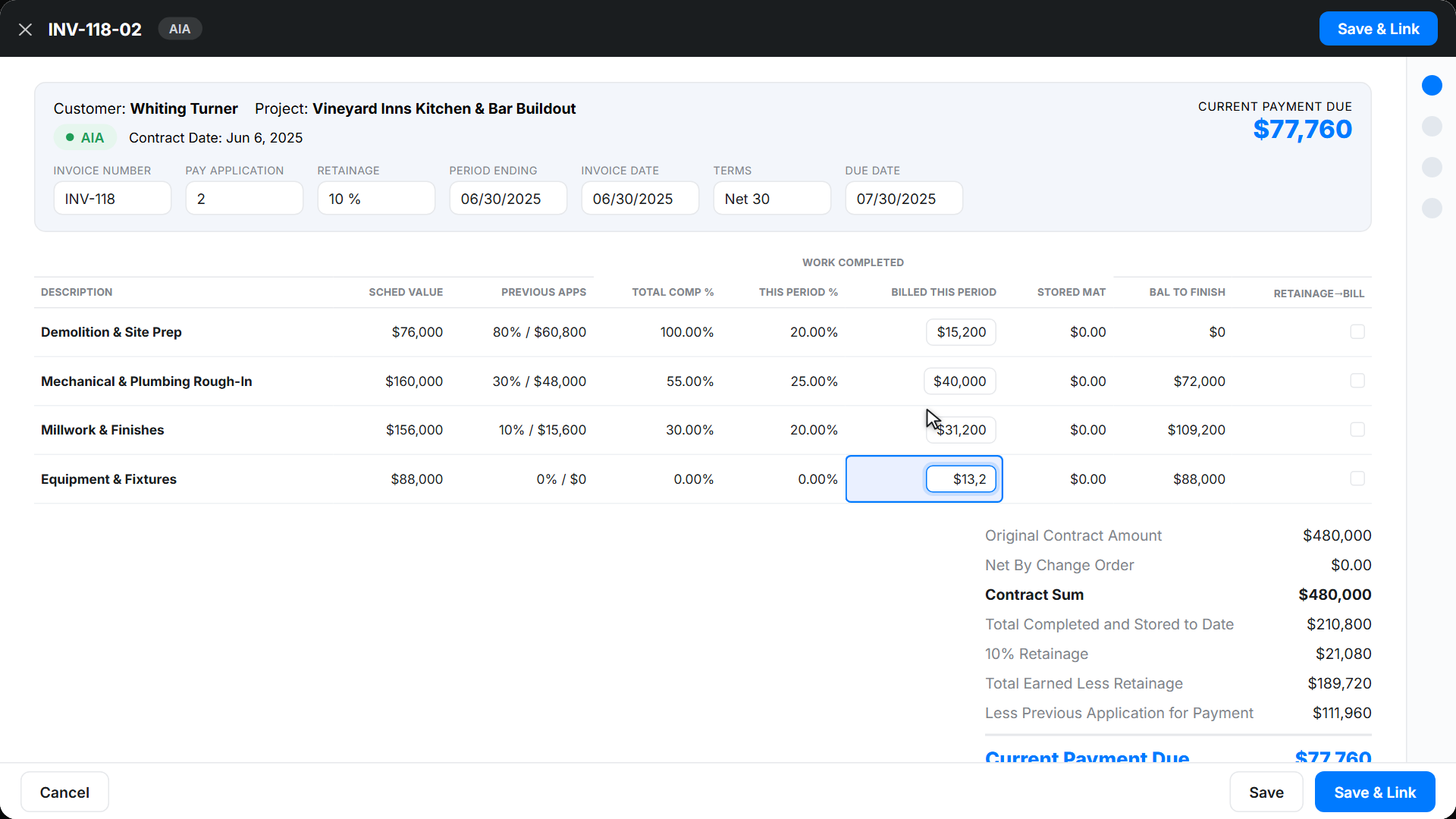
Understanding Retainage in Construction Billing
Retainage is a key concept in construction billing that directly impacts both contractors and project owners. In most construction contracts, a small percentage of each payment is withheld until the project is substantially complete. This withheld amount, called retainage, acts as a financial incentive for contractors to finish the job according to the contract terms and helps protect project owners from incomplete or subpar work.
Why is retainage so important? For contractors, it can tie up cash flow for months, making accurate tracking essential. For project owners, it provides assurance that work will be completed as promised. Typically, retainage is set at 5% to 10% of each progress payment, but the exact percentage depends on the contract. Understanding how to bill retainage on AIA forms is crucial for keeping payments timely and avoiding disputes.
Retainage appears in progress billing cycles, especially when using AIA billing software or managing complex projects. If you’re handling AIA retainage billing, it’s vital to track withheld funds accurately and ensure they’re released at the right time. Our platform automates retainage calculation and integrates seamlessly with progress billing software for smooth, transparent payments.
In the next section, we’ll break down the AIA G702 and G703 forms to show how retainage fits into industry-standard billing workflows.
The AIA G702/G703 Forms: Structure and Purpose
Construction projects, especially those involving commercial, government, or multi-phase work, often require standardized billing documentation. The AIA G702 (Application and Certificate for Payment) and G703 (Continuation Sheet) forms are widely recognized tools for this purpose. They provide a clear, organized method for contractors, such as general contractors, HVAC professionals, and plumbers, to submit payment requests, detail work completed, and document retainage calculations.
Understanding the G702 Application for Payment
The G702 form acts as the cover sheet for each payment application. It summarizes the project’s financials, showing the contract amount, total completed work to date, change orders, retainage withheld, and the net amount requested for payment. The form requires signatures from both the contractor and architect or project manager, certifying that the work and payment details are accurate.
- Line 5: Completed Work (from G703)
- Line 6: Stored Materials
- Line 7: Total Completed and Stored
- Line 8: Retainage (usually calculated as a percentage of completed and stored work)
It’s critical to enter the correct retainage percentage here. Errors in this field can delay payments and create disputes.
Breaking Down the G703 Continuation Sheet
The G703 form supports the G702 by providing a detailed “Schedule of Values” for the project. Each line item corresponds to a specific portion of the contract, such as labor, materials, or change orders. Contractors must list the original contract amount for each item, work completed this period, cumulative work, retainage, and the balance to finish.
- Column G: Work Completed (This Period)
- Column H: Total Completed and Stored to Date
- Column I: Retainage (applied to each line item)
The G703’s detailed structure helps prevent billing errors and provides transparency for all stakeholders. It’s especially valuable for those handling complex jobs, like general contractors or multi-trade subcontractors.
Using an AIA billing software solution, such as Werx, ensures that these forms are completed accurately every cycle. Our platform automates calculations for retainage, tax, and markup, reducing manual errors and saving time.
If you want a more efficient process, explore how AIA pay app automation and progress billing software can simplify retainage tracking and reporting. Next, we’ll walk through exactly how to bill retainage on these forms, step by step.
Step-by-Step: How to Bill Retainage on AIA Forms
Billing retainage on AIA forms can seem overwhelming, but it’s actually a structured process once you know where each figure goes. Let’s break down how to bill retainage on AIA forms, using both the G702 and G703, so you get paid accurately and on time.
Step 1: Calculate Retainage Percentage
First, determine the retainage percentage specified in your contract. Most agreements call for 5% or 10%, but always double-check. This percentage applies to both work completed and materials stored.
Step 2: Enter Retainage on the G703 Continuation Sheet
The G703 form is where you list each line item of your Schedule of Values. For every line:
- Update the amount of work completed and stored for each line item (Columns G and H).
- Apply the retainage percentage to the “Total Completed and Stored to Date” (Column I).
- For example, if you completed $20,000 worth of work and your retainage is 10%, enter $2,000 in Column I for that line.
Repeat this for every line item. The sum of all retainage values in Column I will be referenced on your G702.
Step 3: Summarize Retainage on the G702 Application
On the G702, Line 5 pulls the total from the G703 “Total Completed and Stored to Date.” Line 6 covers stored materials. Line 7 is the sum of Lines 5 and 6. Line 8 is where you enter the total retainage withheld—this should match the sum of all Column I values from the G703.
For instance, if your G703 shows $5,000 total retainage, Line 8 on the G702 should also show $5,000. This ensures consistency and keeps the payment application clear for both parties.
Step 4: Double-Check the Math
Check your calculations for each line item and for the overall totals. Inaccuracies can lead to payment delays or even rejection of your application. With Werx’s AIA billing software, the system calculates retainage for every line and auto-fills the correct totals, reducing human error.
Step 5: Submit and Track
Once you’ve filled out both forms, submit them to the architect or project owner for approval. Always keep copies for your records. With progress billing software from Werx, you can easily track which retainage amounts are still withheld and when they’re due for release.
Learning how to bill retainage on AIA forms is a must for any contractor managing large or ongoing projects. Automating these steps with Werx makes the process faster and more accurate, freeing up your time for the work that matters most.
Common Mistakes and How to Avoid Them
Accurate AIA retainage billing is crucial for timely payments and smooth project management. However, many contractors and subcontractors run into common pitfalls that can cause delays, disputes, or even financial loss. Knowing what to watch out for—and how to avoid these errors—keeps your billing on track and your cash flow healthy.
Miscalculating Retainage Percentages
One of the most frequent mistakes is entering the wrong retainage percentage on either the G702 or G703 forms. Sometimes, the contract will change retainage rates partway through a project, or apply different percentages to stored materials versus completed work. Always double-check your contract and confirm the correct rate before submitting any application.
- Review contract documents before each billing cycle.
- Check if change orders impact retainage rates or calculations.
- Update your forms immediately if the retainage terms change.
With Werx’s AIA pay app automation, the software handles retainage calculations automatically, even if project terms shift.
Incorrect Line Entries and Schedule of Values Errors
Another problem is placing retainage amounts on the wrong lines or failing to update the Schedule of Values. This can cause confusion, payment rejections, or disputes with project owners and architects. Always ensure that:
- Retainage is listed in Column I of the G703 for each line item.
- The sum of retainage matches what’s entered on Line 8 of the G702.
- All work, materials, and change orders are properly reflected in your Schedule of Values.
Our AIA billing software helps keep your forms consistent and organized, preventing these kinds of entry mistakes.
Forgetting to Update Change Orders
Change orders often get overlooked when updating retainage calculations. If you add or remove scope from the contract, it affects the total retainage amount. Failing to adjust your forms can lead to underbilling or overbilling, which will frustrate both parties.
- Always update the G703 to include new change order line items.
- Recalculate retainage totals after every change order.
Werx automatically integrates change orders into your progress billing workflow, making it easy to keep everything current and accurate.
Related Reading
For more tips on preventing billing mistakes, see our posts on progress billing software and retainage best practices.
Avoiding these mistakes not only speeds up payment but also builds trust with your clients. Leveraging digital tools like Werx’s AIA billing automation can help you avoid costly errors and keep your projects moving forward.
How Werx Simplifies AIA Retainage Billing
Managing retainage manually on AIA forms can eat up hours and increase the risk of costly errors. Werx was built to remove that frustration by automating the most time-consuming parts of AIA retainage billing. Our system is designed to make sure you never miss a step, whether you’re a general contractor, HVAC pro, or running a plumbing business.
Automated Retainage Calculations
One of the biggest challenges with AIA billing is calculating retainage for each line item and making sure totals stay consistent across forms. With Werx, you set the retainage percentage for your project once, and our AIA billing software does the rest. Each line on your Schedule of Values is updated automatically—no more worrying about missed entries or math mistakes.
- Retainage percentages are applied to both completed work and stored materials.
- Changes to retainage terms or contract scope are reflected instantly in your pay apps.
- The software ensures that the G702 and G703 forms always match.
Seamless Progress Billing Integration
Retainage is just one part of the progress billing cycle. Werx brings it all together, linking retainage automation with progress billing software for a truly streamlined workflow. When you add a change order or update your Schedule of Values, Werx recalculates retainage and keeps all documents in sync.
- Change orders are integrated automatically—no need for manual updates.
- Track retained funds and their release with simple dashboards.
- Receive alerts when retainage is eligible for release, keeping your cash flow healthy.
Real-Time Error Checking and Compliance
Mistakes on AIA forms can hold up payments for weeks. Werx’s built-in validation checks catch inconsistencies, incorrect percentages, and missing data before you submit. This means less back-and-forth with architects or owners and faster approvals.
Built for Every Contractor
Whether you’re a general contractor, HVAC contractor, electrician, roofer, or plumber, Werx adapts to your workflow and project size. Our intuitive dashboards and guided forms ensure your team can handle AIA retainage billing confidently, even if they’re new to the process.
Switching to Werx means you spend less time on paperwork and more time running your business. From the first estimate to the final retainage release, our automation and integration tools help you get paid faster and more accurately, every single time.
Frequently Asked Questions About AIA Retainage Billing
Many contractors, project managers, and bookkeepers have questions when it comes to handling retainage on AIA forms. Below, we answer some of the most common queries to help you navigate the process with confidence and accuracy.
What percentage is typical for retainage in construction projects?
Most construction contracts set retainage at 5% or 10% of each progress payment. However, this percentage can vary depending on the project size, type, or even local regulations. Always check your contract documents to confirm the specific rate. If you’re using a digital platform like Werx, you can set and adjust retainage percentages for each project, making compliance easy.
How does retainage release work?
Retainage is usually released after the project reaches substantial completion, or once all punch-list items are resolved. The exact timing is outlined in your contract. Typically, you’ll submit a final AIA pay application, showing the retainage to be released. With progress billing software like Werx, you can track retainage balances and know exactly when it’s time to request payment.
How does automation improve retainage accuracy?
Automation eliminates manual errors that commonly occur in retainage calculations and form entries. Werx’s AIA billing software automatically applies retainage percentages, syncs amounts across all forms, and checks for inconsistencies before submission. This means you’re less likely to face payment delays due to mistakes or missing data.
What happens if a change order is issued after retainage is set?
If a change order modifies the contract amount or scope, your retainage calculation should also be updated. In Werx, change orders are integrated automatically into your Schedule of Values and reflected in all future pay applications. This keeps your retainage totals current and compliant.
Can Werx handle industry-specific requirements for retainage?
Absolutely. Werx adapts to your workflow and contract terms, ensuring retainage is managed properly for every type of job.
If you have more questions or want a deeper dive into how Werx simplifies AIA retainage billing, explore our AIA pay app automation resources or schedule a demo with our team.
To Wrap Things Up: Making Retainage Easy with Werx
Mastering AIA retainage billing doesn’t have to be a stressful, error-prone process. When you understand how to bill retainage on AIA forms and take advantage of automation, you can streamline payments, reduce disputes, and keep your projects moving forward. For contractors, bookkeepers, and project managers, clarity and accuracy in retainage are crucial for both compliance and healthy cash flow.
Werx empowers your business by automating each step of AIA retainage billing—from setting the correct retainage percentage to ensuring every line item and change order is reflected accurately. Our AIA billing software and progress billing software integrate seamlessly, handling even the most complex projects with ease. This means less time double-checking forms and more time focusing on the jobsite.
Our platform is built for all types of contractors—whether you’re managing large commercial builds as a general contractor, handling HVAC installations, or running a busy plumbing business. Werx takes the guesswork out of retainage, helping you track withheld funds, manage change orders, and ensure timely releases at project milestones.
Here’s what you gain with Werx:
- Automatic, contract-compliant retainage calculations
- Error checking for every pay application
- Instant integration of change orders and schedule adjustments
- Real-time dashboards to monitor outstanding and released retainage
- Support for industry-specific needs—HVAC, plumbing, general contracting, and more
With Werx, you don’t just fill out forms—you gain a partner in construction management who helps you get paid accurately and on time. If you’re ready to eliminate headaches from your retainage process, start your 30-day free trial or schedule a demo to see how Werx can transform your billing workflow.
Want to learn more about pricing or see how Werx fits your business? Check out our pricing plans and discover how simple, accurate AIA retainage billing can be.