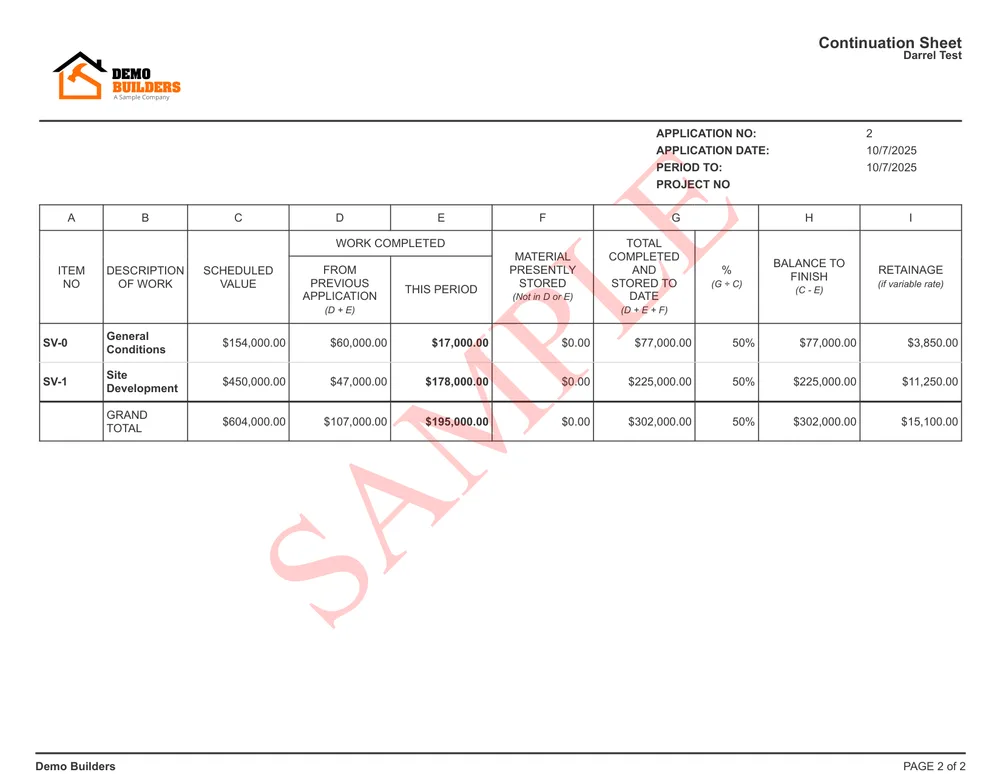
Understanding Stored Materials in AIA Pay Applications

When managing construction projects, knowing how to bill for stored materials on AIA pay applications is essential for accurate cash flow and compliance. Stored materials are items you’ve purchased and are holding for future installation—think HVAC units, windows, or flooring sitting in a warehouse. These aren’t yet installed but are a real cost you’ve incurred. Billing for these correctly ensures you get paid for what’s on hand, not just what’s in the ground.

Owners and architects want transparency and proof before approving payment for stored materials. That means clear documentation and a strong audit trail are crucial. Missteps can lead to payment delays or even disputes, so it’s important to understand the rules up front. Each AIA pay app relies on a Schedule of Values, which breaks down every component of the job—including stored materials—for review and approval. This is where organized tracking and solid recordkeeping become your best friends.

With the right AIA billing software, managing stored materials, documenting proof, and automating your AIA pay app process becomes a whole lot easier. The Werx platform streamlines these steps, so you can focus on moving your project forward and keeping your accounting straight. Next, let’s look at what kind of documentation you need to submit when billing for stored materials on an AIA pay app.

The Essential Documentation: Proof Required for Stored Materials

When you’re figuring out how to bill for stored materials on AIA pay apps, documentation is everything. Owners, lenders, and architects all need to see proof that you’ve actually purchased, received, and securely stored the materials you’re billing for. This is especially important for contractors in industries like HVAC, Electrician, General Contractors, Plumbers and more, where high-value equipment often sits in storage before installation. Submitting incomplete or unclear documentation can slow down your payments and raise red flags during audits.

What Documentation Is Needed?

  • Purchase Invoices: Show that the materials have been bought and paid for. Make sure these match the amounts you’re claiming on the pay app.
  • Delivery Receipts: Prove that materials have arrived at the storage location. This could be the jobsite or an approved off-site warehouse.
  • Photographic Evidence: Take clear photos of the stored materials, including identifying labels, lot numbers, and any packaging that confirms quantity and condition.
  • Storage Agreements: If materials are stored off-site, you’ll need a formal agreement outlining where and how they’re stored. This protects both you and the project owner by showing that materials are secure and insured.
  • Insurance Certificates: Provide proof that stored materials are covered by insurance while in storage, whether onsite or offsite.

Why Is Documentation So Critical?

Clear, organized documentation helps prevent disputes, ensures compliance, and speeds up approval for payment. For example, a general contractor managing multiple trades must keep meticulous records to support each line item on the Schedule of Values. If you’re working in HVAC or plumbing, large-ticket items like boilers or air handlers require even more scrutiny—owners want to know these materials are real, accounted for, and ready to install.

Storing materials offsite? Owners and architects may request site visits or third-party verification before releasing funds. Your documentation should always be ready for review. That’s where using AIA pay app automation in Werx helps—upload invoices, receipts, and photos directly to your pay app record for fast, transparent review.

Best Practices for Submitting Proof

  • Double-check that all documents are legible and match the quantities and values you’re billing for.
  • Organize digital files by project and pay app date—Werx makes this easy with project-based folders and audit trails.
  • Communicate with owners or architects early if you’re storing materials offsite to avoid last-minute surprises.

With the right documentation in place, your stored materials billing process becomes smooth and audit-ready. Next, we’ll dive into the math behind billing for stored materials and how to avoid common calculation errors. For more on streamlined workflows, check out our progress billing software for construction projects.

Calculating Stored Materials: The Math Behind the Numbers

Accurately calculating the value of stored materials is a critical step in learning how to bill for stored materials on AIA pay apps. Owners, lenders, and accountants expect the numbers to be precise, traceable, and consistent with the rest of your progress billing. If your calculations are off, you risk payment delays or even compliance issues during an audit.

Calculating Stored Materials

Key Elements of Stored Material Billing

  • Invoice Value: Start with the actual cost of the materials, as shown on your supplier’s invoice.
  • Markup: Apply your contractually allowed markup percentage, if applicable. Always follow what’s specified in your contract or the Schedule of Values.
  • Sales Tax: Include sales tax if your contract allows it, and make sure it matches the local jurisdiction requirements.
  • Retainage: Subtract the retainage percentage as required by the contract. This holdback protects the owner and is usually released after installation.

A Step-by-Step Example

  1. Let’s say your supplier invoice for HVAC units is $15,000.
  2. Your contract allows a 10% markup, so add $1,500.
  3. Sales tax on the total (let’s say 8%) is $1,320.
  4. Total stored materials value to bill: $15,000 + $1,500 + $1,320 = $17,820.
  5. If your contract requires 10% retainage, subtract $1,782. Your billable amount is $16,038.

It’s vital not to double-bill. Once these materials are installed, only bill for the labor or installation cost—don’t re-bill the material value already claimed as stored. Using progress billing software in Werx, all these calculations are automated, including retainage and markup, reducing errors and saving hours of manual checking.

Tips for Staying Audit-Ready

  • Keep your math clear and show all calculations in your pay app submission.
  • Double-check that your invoice amounts, markup, and retainage match the contract and the AIA billing software you use.
  • Store all supporting documents—Werx helps keep your audit trail organized and accessible for every project.

Proper math and documentation ensure you get paid accurately for stored materials and avoid compliance headaches. Up next, learn how to pull all these steps together and actually submit a stored materials pay app with confidence.

Step-by-Step Guide: How to Bill for Stored Materials on AIA Pay Apps

Understanding how to bill for stored materials on AIA pay applications means mastering a process that combines documentation, math, and compliance. Whether you’re a general contractor, HVAC specialist, or plumber, following a systematic approach is the key to getting paid promptly and keeping your audit trail clean. Here’s a clear, actionable guide to help you submit your stored material costs with confidence.

1. Gather and Organize Documentation

  • Collect supplier invoices, delivery receipts, storage agreements, insurance certificates, and photos.
  • Sort all files by project and pay app period—using a platform like Werx makes this easy and keeps your records accessible for review.

2. Complete the Schedule of Values

  • Update your Schedule of Values to include a line for stored materials for each division or scope where you’re billing them.
  • Be specific—label each line with clear descriptions, such as “Stored HVAC Equipment” or “Plumbing Fixtures in Storage.”

3. Fill Out the AIA Pay Application Form

  • On the pay app, enter the dollar amount of stored materials under the “Materials Presently Stored” column for the correct line item.
  • Subtract any previous billings to avoid double-billing—your software should flag discrepancies for you.

4. Attach Supporting Proof

  • Upload or attach your documentation directly to the pay app. In Werx, this can be done in just a few clicks, linking each document to its respective line item for fast review by the architect or owner.

5. Apply Markup, Tax, and Retainage

  • Let your progress billing software handle the math, or calculate it yourself according to your contract terms. Don’t forget to apply the correct retainage percentage and document it in the pay app.

6. Review and Submit

  • Double-check your entries for accuracy. Make sure all numbers add up and all documents are attached. Submit your pay app through the designated channel—whether it’s via email, a client portal, or directly in Werx.

7. Maintain an Audit Trail

  • Archive all pay app submissions, approvals, and correspondence. Platforms like Werx automatically log these actions, making it simple to track who submitted what and when.

By following these steps, you’ll create a smooth process for billing stored materials on AIA pay apps. You’ll reduce errors, speed up approvals, and be ready for any audit or project review. For further guidance, explore our resources on AIA pay app automation and best practices for billing and compliance.

Ensuring a Solid Audit Trail: Tips for Transparency and Compliance

General contractor reviewing stored materials math for AIA pay apps

Establishing a strong audit trail is crucial when you’re learning how to bill for stored materials on AIA pay applications. A solid audit trail not only helps you get paid faster but also protects your business during project reviews or financial audits. Owners, architects, and even your own accounting team need confidence that every dollar billed is supported by proper documentation and transparent recordkeeping.

What Is an Audit Trail and Why Does It Matter?

An audit trail is a chronological record of all actions, documents, and communications related to a billing event. For stored materials, this means every invoice, receipt, storage agreement, and email should be easily accessible and clearly linked to the correct pay app. If a dispute arises or an auditor comes knocking, you want to quickly show the complete story of each transaction—no scrambling for missing files or explanations.

Best Practices for Maintaining an Audit Trail

  • Centralize Your Documentation: Store all related documents in a single, organized system. Digital platforms like Werx make this effortless by tying files to each project and pay app automatically.
  • Log Every Change: Any edits, updates, or resubmissions should be tracked with timestamps and user IDs. This helps prevent confusion if multiple team members work on the same project.
  • Attach Proof to Each Pay App: Always upload supporting documentation directly to the corresponding line item. This way, reviewers see proof alongside your billing numbers.
  • Retain Communications: Save emails or messages with owners, architects, or suppliers that clarify material status, delivery issues, or approvals. These communications can resolve questions later.
  • Use Software With Audit Trail Features: Werx’s AIA billing software and progress billing software are designed to create a digital paper trail for every transaction, making compliance simple and stress-free.

How Werx Streamlines Transparency

Our platform automatically logs every upload, change, and submission. Each document is attached to the correct project and pay app, creating a transparent workflow that can be reviewed anytime. Whether you’re a general contractor, HVAC company, or plumber, this approach reduces the risk of missing documentation and ensures you’re always ready for review.

Having a robust audit trail isn’t just about compliance—it’s about building trust with project owners and keeping your own accounting airtight. For more guidance on transparent billing, explore the full range of features in our AIA pay app automation and see how our retainage automation keeps you audit-ready, every step of the way.

Frequently Asked Questions: Stored Materials on AIA Pay Apps

Many contractors and project managers have questions about how to bill for stored materials on AIA pay apps. Getting clear answers can help you avoid mistakes, speed up payments, and ensure compliance. Below, we address some of the most common concerns raised by professionals in the field.

What if Materials Are Not Delivered to the Jobsite?

Owners and architects typically require proof that materials have arrived at an approved location—either the jobsite or an authorized offsite storage facility. If you’re storing materials offsite, you’ll need to provide a storage agreement, insurance documents, and often photographic evidence of the materials in storage. Communicate early with the owner to ensure your storage location meets their requirements and always attach the proper documentation to your pay app.

How Does Retainage Apply to Stored Materials?

Retainage is usually withheld from stored materials just as it is for work in place. This protects the project owner until the materials are installed and the job progresses. Your retainage automation in Werx makes this process simple—automatically calculating and applying the correct retainage to every line item, including stored materials. Once the materials are installed, you can bill for the retainage amount in a future pay app cycle.

Can You Bill for Materials Stored Off-Site?

Yes, but you must meet strict documentation standards. Provide a storage agreement, proof of insurance, delivery receipts, and detailed photos. Owners may also request to inspect the storage facility before approving payment. Using AIA billing software like Werx, you can upload and organize all supporting documents for easy review.

Fencing contractor - AIA pay app for stored materials

How Werx Simplifies AIA and Progress Billing for Stored Materials

Managing how to bill for stored materials on AIA pay applications can be overwhelming—especially when you’re juggling complex documentation, precise calculations, and compliance requirements. This is where Werx steps in, transforming a tedious process into a streamlined, automated workflow for contractors of all types, from general contractors to HVAC, plumbing, and specialty trades.

Automated Calculations for Accuracy

Werx’s AIA billing software eliminates manual math errors by automatically applying markup, tax, and retainage based on your contract terms. Whether you’re billing for a pallet of plumbing fixtures or high-value HVAC equipment in storage, Werx calculates the exact amount you should bill for stored materials and tracks it through the project’s lifecycle. This helps prevent double-billing and ensures that every dollar aligns with your Schedule of Values.

Seamless Documentation and Audit Trails

With Werx, you can upload supplier invoices, delivery receipts, insurance documents, and photos directly to your pay app. Each file is linked to its corresponding line item, so reviewers can quickly verify your claims. This digital audit trail is a lifesaver during audits or disputes—every document, submission, and approval is logged and time-stamped for total transparency. Our system also keeps your team and clients on the same page by centralizing all communication and documentation.

Effortless Compliance for Every Industry

Different industries have unique requirements for stored materials billing. Werx adapts to the needs of HVAC contractors, plumbers, and general contractors alike. No matter your specialty, our progress billing software helps you stay compliant, organized, and audit-ready.

Retainage and Payment Management Made Easy

Retainage calculations are built into every pay app, so you never have to worry about miscalculating or forgetting to apply holdbacks. When it’s time to release retainage after installation, Werx makes it easy to bill for the withheld amounts—keeping your cash flow predictable and your books accurate.

By simplifying every aspect of AIA and progress billing for stored materials, Werx gives you more time to focus on project delivery, client relationships, and business growth. For a hands-on look at how our features can help your company, explore our AIA pay app automation and see the difference for yourself.

To Wrap Things Up: Best Practices for Billing Stored Materials

Best Practices for Billing Stored Materials

Successfully mastering how to bill for stored materials on AIA pay apps comes down to a few key best practices. Whether you’re a seasoned general contractor or running a growing HVAC or plumbing business, consistency and transparency are your best allies. Adopting a systematic approach not only helps you get paid faster but also builds trust with owners, architects, and your own accounting team.

Key Takeaways for Contractors

  • Organize Documentation Early: Begin gathering supplier invoices, delivery receipts, storage agreements, and insurance certificates before you’re ready to submit your pay app. This makes the billing process smoother and keeps you ready for any questions or audits.
  • Be Precise with Calculations: Double-check your math, including markup, tax, and retainage, for every line item. Tools like Werx’s AIA billing software and progress billing software help automate this process, reducing the risk of costly mistakes.
  • Maintain a Clear Audit Trail: Link every document to the appropriate pay app and line item. Digital platforms with built-in audit trail features—like Werx—save time and protect your business during reviews.
  • Communicate with Project Stakeholders: If you’re storing materials offsite, let owners and architects know in advance. Proactive communication helps prevent disputes and speeds up payment approvals.
  • Leverage Industry-Specific Tools: Whether you specialize in HVAC, plumbing, drywall, or general contracting, use software that understands your industry’s billing requirements and can adapt to your workflow.

Move Forward with Confidence

Adopting these best practices not only streamlines your AIA pay app submissions but also gives you peace of mind. With every document, calculation, and approval tracked, you’ll always be ready for audits and able to answer any questions that come your way. Plus, using Werx means you’re supported by robust features designed to simplify every step of the process—from initial documentation to final retainage release.

Ready to see how Werx can help your team bill for stored materials with less stress and more accuracy? Try Werx free for 30 days or schedule a personalized demo to experience the benefits firsthand. Get your billing right, get paid faster, and keep your projects moving forward.