

Time keeping with Werx lives in one place. You add crews, assign them to jobs, track hours, edit and approve timesheets, and run payroll reports in a few clicks.
It is an online tool built for contractors and project managers who want more control over their hours. It also syncs with QuickBooks, so your finances stay in one place. There is no costly training. Werx is simple to learn.
What makes Werx simple to use?

- Start using it right away, with no manual or tutorial.
- No special equipment. Just an internet connection and any web browser.
- Use it from anywhere, anytime, on any device.
For the contractor's view of the same tools, see our guide to easy timekeeping for contractors.
What does the time-tracking dashboard show?
The time tracking dashboard gives you the full picture of your hours. It helps you watch employee hours, approve time off, and spot patterns. The dashboard includes:
- List of employees
- Groups
- Recorded hours
- Overtime
- Sick time
- PTO
- Total hours
- Approval status
A date range selector lets you view a week, pay period, or custom range. Filters narrow the table, and the "Reports" button pulls your reports fast.
How do you track hours by project?
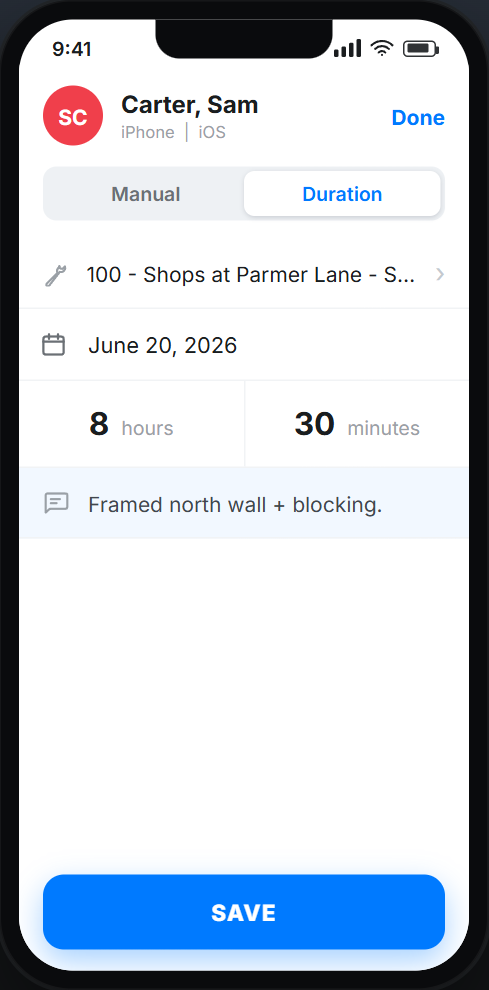
The "Time Sheet" page shows and edits individual timesheets. Click an employee name on the dashboard to open theirs.
From there you see every entry, filtered by date and project. A manager can add, edit, and delete time entries. That keeps hours on each job clean and makes managing the crew easier.
How do you edit a timesheet?
If a worker put in extra hours or took vacation, you can fix the timesheet so pay is right. Click "Add Time," pick the employee and project, set the date and clock in or out times or a duration, add a task note, and save. The new hours post to their weekly total.
You can also see the change history under the "History" tab. That helps if a dispute over hours ever comes up.
How do approvals and sending work?
Once timesheets are filled in and edited, the manager approves them with the "Approve" button.
Later, employees can view or print timesheets from the "Reports" button. After approval, the manager hits "Send" to push them for processing, which emails the employee a link to their timesheet. To get hours ready for payroll, approve them before each pay run.
What else does Werx do?
Werx is a full set of tools for contractors, not just time keeping:
- Estimates: Build professional estimates and proposals for client approval.
- Progress billing: Bill clients based on percent of work complete.
- AIA-style billing: Generate standard AIA billing forms.
- QuickBooks integration: Sync your financial data without double entry.
- Payment processing: Accept online payments via Stripe.
Is Werx the right fit for your time keeping?
Werx fits contractors who run crews and bill clients for labor. If you juggle hours across jobs or face payroll deadlines, the dashboard and approval flow save real time.
A solo operator on one small job may not need every feature yet. But once hours split across jobs and crews, paper and spreadsheets start to cost you money.
Key takeaways
- Werx keeps time keeping in one place, from tracking hours to payroll reports.
- The dashboard shows hours, overtime, PTO, and approval status at a glance.
- You can edit, approve, and send timesheets, with a full change history for disputes.
- A QuickBooks sync keeps payroll and accounting clean without double entry.
- It fits any contractor running crews or billing clients for labor.


