

The right contractor software is the one that fixes your biggest daily headache first. Name that pain, then match it to the features that solve it. This guide walks through what to look for, how to compare tools, and when a platform is the right fit. Pick for the work you do, not the longest feature list.
How do you figure out what you need?
Start by looking at your current process. Find the steps that eat time or cause errors, like re-typing estimates into your books or chasing late payments. Those are the jobs your software should take off your plate first.
Most contractors need solid project management at the core. You run several jobs at once, so look for clear progress tracking and easy updates between the office and the field. If you cannot see where each job stands at a glance, the tool is not pulling its weight.
Accounting matters just as much. A clean QuickBooks integration pushes estimates, invoices, and payments to your books without manual entry. That cuts errors and frees you to run the work.
Last, you need flexible estimating and cost tracking. Werx covers time and materials invoicing, change orders, and retainage so your money picture stays accurate from bid to final pay.
What features should you look for?

Match each feature below to a real task in your shop. If you do not do the work, skip the feature.
- AIA and progress billing. On commercial and larger jobs, AIA-style billing lets you invoice by percent complete using the standard G702 and G703 forms. That keeps cash flowing and matches what owners expect.
- Job estimating and proposals. Accurate bids are the base of a profitable job. Look for fast, detailed estimates you can turn into branded proposals.
- Time and materials invoicing. For variable-scope work, time and materials invoicing itemizes labor, materials, and expenses so clients see exactly what they pay for. That cuts disputes.
- Change orders. Jobs change. You need a simple way to document and get approval on revisions before crews do the work.
- Online payments. Letting clients pay online gets you paid faster and cuts trips to the bank.
- Real-time labor tracking. Tracking labor against each job protects your margin and shows cost overruns while you can still fix them.
How do you compare your options?
Once you know your needs, weigh each tool against these factors:
- Ease of use. If crews and office staff cannot pick it up fast, it will not get used. Test it with your least tech-comfortable team member.
- Right feature set. Look for the features you actually need, not a giant list you will never touch.
- Integration. Check how well it connects to the tools you already run, especially your accounting.
- Support and training. Real help after the sale matters. Look for responsive support and clear training.
- Room to grow. The tool should handle more jobs and users as you scale.
- Price versus value. Weigh the cost against the time it saves and the errors it prevents, not just the sticker.
The best proof is what other contractors say. Read Werx reviews and check ratings before you commit. For a structured approach, the academy guide on how to choose a contractor tech stack lays out the steps.
When is the right software worth it?
It is worth it when manual work is costing you jobs, margin, or sleep. If you bid blind, miss payments, or re-enter the same numbers twice, a connected platform pays for itself fast. The same is true if clients ask for digital estimates or AIA billing you cannot produce.
You can wait if you run a handful of short jobs and your paperwork is light. A simple invoice may be enough at that size. As you grow, cloud-based contractor software becomes the safer call. Picking the right accounting setup early also helps you avoid a painful switch later.
Why contractors choose Werx
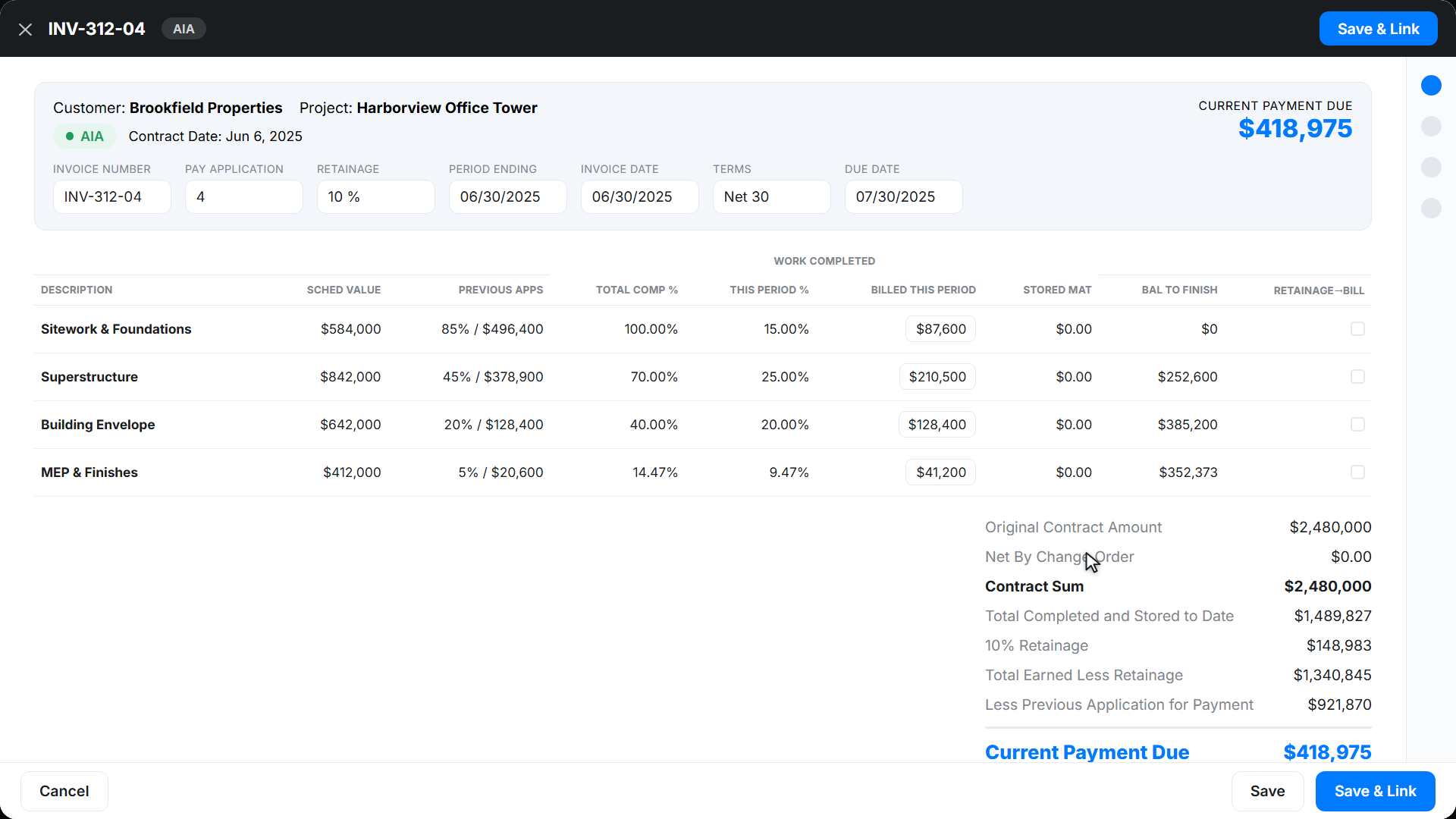
After you name your needs and compare options, here is where Werx fits:
- Built for small to midsized contractors across HVAC, painting, remodeling, roofing, and plumbing.
- Simple interface that cuts the learning curve for office and field.
- QuickBooks Online sync that keeps your books current without double entry.
- Strong data protection that meets industry standards.
- Responsive support with training resources to get your team going.
- A 14-day free trial with no credit card required.
Key takeaways
- Pick software that fixes your biggest daily pain point first, not the longest feature list.
- Core needs for most contractors: project tracking, estimating, billing, and QuickBooks sync.
- Match each feature to real work you do, like AIA billing or time and materials invoicing.
- Compare tools on ease of use, integration, support, room to grow, and value.
- Contractor software like Werx is worth it once manual work starts costing you jobs or margin.


